
As an Amazon Associate & Influencer, we earn from qualifying purchases you might make if you click any of the links or buttons on this page at no expense to you.
DIN stands for Deutsches Institut für Normung, the German Institute for Standardization. In car stereos, it describes a standard mounting-size category: single-DIN is nominally 180 × 50 mm, while double-DIN is 180 × 100 mm—about 7 × 2 inches versus 7 × 4 inches. Double-DIN is twice the height, not twice the width.
That tells you where to start shopping. It does not guarantee a radio will fit, retain your factory controls or have the features you want. A large touchscreen can even use a single-DIN chassis. The useful buying decision combines mounting format, usable dash space and the correct installation parts.
Jump to: DIN meaning · Size chart · Screen versus chassis · Check your car · DIN conversions · Parts you need · Relevant stereo options · FAQs
What does DIN mean in a car stereo?
DIN is the name of the standards organization, rather than a rating of the radio’s sound quality. The familiar car-radio size terminology comes from standardized installation formats. DIN describes its role as Germany’s standards body; the international standard ISO 7736 covers the installation space for front-installed car radios and their connections.
When a receiver is advertised as 1-DIN, single-DIN, 2-DIN or double-DIN, read that as mounting-format information. Check the individual model for Bluetooth, Apple CarPlay, Android Auto, a CD drive, camera inputs, amplifier outputs and actual dimensions. None of those features follows automatically from the DIN label.
Car stereo DIN size chart
| Format | Nominal width × height | What the label usually describes | Important limit |
|---|---|---|---|
| Single-DIN / 1-DIN | 180 × 50 mm; about 7 × 2 in | A compact receiver format, often with a text display and physical controls. | Can also support a separate floating or flip-out screen; check the full front assembly. |
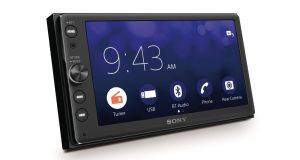
| Double-DIN / 2-DIN | 180 × 100 mm; about 7 × 4 in | Twice the nominal height, with the same nominal width as single-DIN. | A common touchscreen format, but the label does not guarantee a touchscreen or better sound. |
| 1.5-DIN / DIN-and-a-half | Roughly 7 × 3 in; confirm the specific application | An older intermediate factory-radio format, notably in some GM vehicles. | Use the exact vehicle dash-kit application instead of assuming a modern receiver drops in. |
| Half-DIN / 0.5-DIN | About 7 × 1 in for commonly labeled accessories | A low-profile accessory format, often used for an equalizer or processor. | Not the same as 1.5-DIN and not automatically a complete replacement radio. |
NOMINAL SIZE · WIDTH × HEIGHT
Same width. Double the height.
SINGLE-DIN / 1-DIN
← 180 mm nominal width →
50 mm high
About 7 × 2 inches.
DOUBLE-DIN / 2-DIN
← 180 mm nominal width →
100 mm high
About 7 × 4 inches.
Nominal format comparison, not a cutting template or exact mounting-opening drawing. Actual chassis, sleeve, trim and installation dimensions vary by product.
Why do specifications also show 178 mm or 182 mm?
The metal chassis, mounting sleeve, front trim and required installation space are different measurements. A nominal 180 mm category can therefore appear alongside a 178 mm chassis measurement or a larger installation dimension. Treating every number as the exact hole to cut is where mistakes happen.
For example, Kenwood lists the DMX4710S main-unit installation size without its sleeve as 178 × 100 × 86 mm, while its separate installation-dimensions row is 182 × 112 × 86 mm. Those rows describe different installation envelopes; they are not permission to cut a universal 182 × 112 mm hole in your dashboard.
Use the exact radio’s installation drawing together with the vehicle-specific kit instructions. If dimensions from a marketplace page appear to describe the shipping box, they are not useful evidence of dash fit.
DIN size and screen size are different measurements
A 6.8-inch, 9-inch or 11-inch screen label is a diagonal display measurement. DIN describes the receiver’s mounting format. A conventional double-DIN touchscreen sits within a taller front opening; a floating screen projects in front of the dash and can attach to a smaller single-DIN chassis.
SCREEN SIZE ≠ DIN SIZE
A large screen can sit in front of a small chassis
IN FRONT OF THE DASH
9-inch display
Measured diagonally
Check vents, hazard switch, controls, shifter and sightlines.
BEHIND THE DASH
1-DIN chassis
Check the mounting kit, receiver depth and rear connections.
Conceptual floating-screen layout, not a product drawing or universal fit claim. The Alpine Halo9 example below uses this general arrangement; use its actual installation dimensions.
That makes a floating display a useful option for some cars with a small radio opening, but the screen is still a physical object in the cabin. It must leave the hazard switch, vents, climate controls and other necessary controls usable. Check the shifter’s movement and the driver’s view too. A screen that technically attaches to the radio but blocks a control is the wrong fit.
Also distinguish a flip-out screen from a fixed floating display. A motorized screen needs room throughout its opening and closing movement. A floating screen has its own adjustment range and locking positions. Neither should be bought from the chassis size alone.
How to find out which DIN size fits your car
Start with a vehicle-specific application guide, rather than measuring the visible factory faceplate. Many factory radios use custom shapes, and a large dashboard panel may include climate controls or trim around a smaller receiver. The visible screen does not reveal the usable mounting space behind it.
- Identify the exact vehicle. Use model year, make, model, body style and trim. Note navigation, the factory amplifier or premium audio package, and any controls integrated into the radio.
- Find the correct dash-kit application. Read whether the kit supports single-DIN, double-DIN, both or a particular style of floating-screen installation. Check any required modifications and factory-equipment exclusions.
- Compare the exact receiver drawing. Check its front assembly, chassis, mounting points and depth against the kit and the available space. A shorter rear body does not make a larger front face fit a smaller opening.
- Allow for connections behind the unit. USB leads, antenna plugs, RCA cables and integration modules need room. Do not plan around bare chassis depth while ignoring plugs and cable routing.
- Check retained functions separately. Steering-wheel buttons, factory amplifier, camera, warning chimes, factory USB and vehicle settings may need specific interfaces. A mechanical fit does not establish electrical compatibility.
- Confirm the complete parts list before ordering. If the vehicle’s screen controls essential functions, establish a documented replacement or retention route before removing it.
The Metra vehicle fit guide is a useful starting point for dash kits, harnesses and related installation parts. Treat application notes as part of the fitment result: a kit listed for one audio package or body style may exclude another. If the documentation leaves an essential factory function unresolved, get a vehicle-specific installation plan before buying the receiver.
Why receiver depth still matters
Two radios in the same DIN category can have very different rear bodies. A receiver without a CD mechanism can be shallow, while a disc receiver may occupy much more of the space behind the dash. Air ducts, support structures and the wiring path can decide which one fits.
A short chassis is worth choosing when the radio cavity is crowded. Keep the extra room for connections and the specified ventilation rather than forcing the harness behind the radio. DIN terminology is not a substitute for the manufacturer’s full installation dimensions.
Can you change from one DIN size to another?
| Starting point | Possible route | What must be true |
|---|---|---|
| Double-DIN opening → single-DIN receiver | A suitable kit can mount the smaller receiver and fill the remaining space, often with a pocket. | The kit must support that vehicle, mounting arrangement and receiver. A pocket is not included with every radio. |
| Single-DIN opening → conventional double-DIN receiver | Only where a documented vehicle-specific conversion creates the required usable opening and clearance. | A trim plate alone cannot create space through a fixed structure, duct or essential control. |
| Single-DIN opening → floating-screen receiver | A compatible single-DIN chassis may provide a large display in front of the dash. | Confirm screen clearance, the radio’s mounting method and vehicle integration; it is not universal fit. |
| 1.5-DIN or custom factory opening → aftermarket receiver | Use the applicable conversion kit and its instructions. | Check the exact year, body and factory system. Some applications require specialist integration or are poor replacement candidates. |
For a double-DIN-to-single-DIN change, the right kit can produce a tidy result without buying a touchscreen you do not need. For the reverse change, look up the supported conversion first. Buying the larger receiver and hoping a generic bezel will solve the space problem is an expensive order of operations.
Is double-DIN better than single-DIN?
Choose the controls and features you will use, within a confirmed installation. A conventional single-DIN Bluetooth receiver is a good choice when you want a volume knob, music and calls. A conventional double-DIN touchscreen is a natural option for on-screen phone navigation in a suitable dash. A floating display is worth considering when a larger map matters and the surrounding controls remain accessible.
DIN size does not rank sound quality. Check the receiver’s continuous amplifier output, preamp connections, tuning controls and compatibility with your existing amplifier or speakers. A basic double-DIN radio can have fewer useful features than a well-equipped single-DIN model.
Be specific about smartphone support as well. Bluetooth audio is not Apple CarPlay or Android Auto, and either platform can be wired or wireless depending on the model. Phone navigation through those apps is also different from a receiver with built-in standalone maps.
For a broader comparison after confirming fit, see our single-DIN car stereo guide or double-DIN head-unit guide. Those guides cover different controls, connections and expansion needs within each format.
What installation parts might you need?
Budget for the installed system, not just the receiver. The radio’s supplied wiring lead does not make it a complete vehicle-specific kit. The exact parts depend on the car and the factory functions you intend to keep.
| Part / check | What it does | Purchase condition |
|---|---|---|
| Dash kit, brackets and trim | Mount and finish the receiver in the vehicle’s opening. | Choose the exact vehicle application and supported DIN/front-display arrangement. |
| Vehicle wiring harness or integration interface | Connect power and audio; a suitable interface may handle factory data functions. | Match the factory audio package and required retained features. A basic harness does not automatically retain them. |
| Steering-wheel-control retention | Keeps supported factory radio buttons working. | May be separate or part of an integration module; check both car and receiver compatibility. |
| Antenna / USB adapters | Adapt the car’s connectors where required. | A factory USB-retention adapter must support the intended data use, not just charging. |
| Factory amplifier and camera interfaces | Handle the original system’s signal and connection requirements. | Confirm amplifier routing and camera connector, supply and video format. A camera input alone is not a retention guarantee. |
| Microphone, phone cable and optional radio tuner | Enable the selected calling, projection or satellite-radio features. | Check what the exact package includes. Additional tuner hardware and service can be separate purchases. |
Three receiver examples for different DIN decisions
These examples illustrate three sensible upgrade paths. Choose one only after confirming the vehicle application; none is a universal installation package. There is no reason to buy a large display when a physical-control radio meets your needs.
| Receiver / format | Best reason to choose it | Main limit | Current price |
|---|---|---|---|
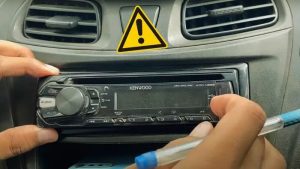
| Kenwood KMM-BT332U Conventional single-DIN | Bluetooth music/calls, front USB/AUX and a physical volume control. | Text display; no CarPlay, Android Auto or on-screen camera view. | Check Current Price on Amazon |
| Kenwood DMX4710S Double-DIN touchscreen installation | 6.8-inch capacitive screen with wired CarPlay and Android Auto. | Wired phone projection; confirm the full mounting envelope and integration parts. | Check Current Price on Amazon |
| Alpine iLX-F509 Halo9 1-DIN chassis with floating display | A larger 9-inch adjustable screen without a conventional double-DIN front layout. | Screen clearance and a full integration plan matter as much as chassis fit. | Check Current Price on Amazon |
Kenwood KMM-BT332U: keep the radio compact and the controls physical

Choose it if: you want a conventional single-DIN receiver for Bluetooth music, calls and USB playback.
Skip it if: your goal is on-screen phone maps, a camera display, CarPlay, Android Auto or CD playback.
This is the sensible type of receiver for an audio-first upgrade: the volume control is immediately accessible, the text display avoids a large screen and the short body is useful in a crowded dashboard. Its front USB and AUX inputs also keep everyday connections within reach.
The KMM-BT332U adds 13-band EQ, time alignment and three pairs of 2.5V preamp outputs, so a compact receiver does not mean giving up system adjustment or amplifier connections. Those outputs carry a signal; they do not power a passive subwoofer.
Fit and package: Kenwood lists a 100 mm installation depth for this model. Leave room for the actual rear connections and use the correct dash kit/harness. Budget separately for the vehicle-specific retention parts. Its Bluetooth connection does not put a navigation app on the text display.
See Kenwood’s KMM-BT332U specifications for the exact connections and installation-size row.
Kenwood DMX4710S: a conventional in-dash touchscreen for phone navigation

Choose it if: your dash supports its mounting envelope and you want wired CarPlay or Android Auto on a 6.8-inch screen.
Skip it if: wireless phone projection is essential or you need a CD/DVD drive.
The DMX4710S is the more useful format when maps and supported phone apps belong in the dashboard rather than on a small text display. The 6.8-inch capacitive screen serves that job without moving to a large floating panel in front of the surrounding controls.
Phone connection: both Apple CarPlay and Android Auto use USB on this model. It also has Bluetooth and a rear-camera input. A compatible factory camera may need an interface, and a new camera is a separate purchase.
Fit and package: the short receiver body still has to match the kit’s mounting method and the entire front assembly. Kenwood lists the main unit without sleeve at 178 × 100 × 86 mm. iDatalink Maestro support can help retain supported factory functions, but the correct module, vehicle harness and configuration are additional requirements—not functions supplied by the DIN label.
See Kenwood’s DMX4710S specifications for the wired phone modes and installation drawings.
Alpine iLX-F509 Halo9: a large screen on a single-DIN chassis
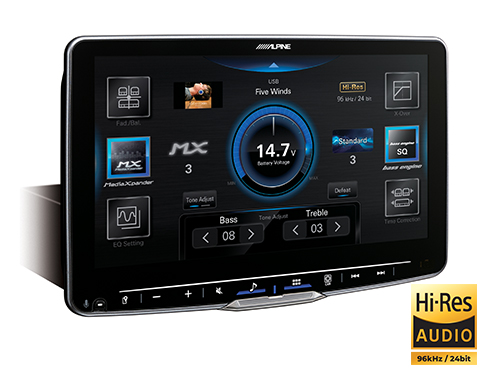
Choose it if: you want a larger map/display and can confirm clearance for a 9-inch floating screen.
Skip it if: the panel would block necessary controls, vents or sightlines, or you only need basic Bluetooth audio.
The Halo9 is the clearest example of why screen size and DIN size must be kept separate. Its adjustable nine-inch display mounts in front of a single-DIN chassis. That gives some small-opening dashboards a large-screen route without pretending the opening itself has become double-DIN.
Choose it for the display arrangement and its CarPlay/Android Auto capability. Its screen adjusts for height, depth and viewing angle, which helps position it around the dash. Adjustment range is not a guarantee: check the receiver’s actual mounting instructions and the screen’s full envelope against your car before ordering.
Fit and package: use the iLX-F509 receiver/display package with the exact vehicle mounting and integration parts. Optional Maestro integration, cameras and satellite-radio hardware are separate decisions. This is not a portable screen that simply sits on top of the dash, and a standard single-DIN opening alone does not establish compatibility.
See the Alpine iLX-F509 product and support information for the adjustable display, single-DIN chassis and current software documentation.
Common DIN mistakes that lead to the wrong purchase
| Mistake | Better decision |
|---|---|
| Using the visible factory screen as the opening measurement | Check the vehicle application, usable cavity, kit and receiver drawing. |
| Assuming a seven-inch screen means double-DIN | Check the mounting format separately from screen diagonal and front trim. |
| Buying double-DIN for better sound alone | Compare the actual audio connections, tuning and system integration. |
| Expecting a basic harness to retain every factory feature | Build a separate retention list for the amplifier, controls, camera, chimes and vehicle settings. |
| Ignoring the rear plugs or a floating display’s surroundings | Check both the space behind the dash and the space in front of it. |
| Ordering a generic conversion kit before checking the application | Verify exact vehicle, trim/audio package and supported receiver arrangement. |
Frequently asked questions
What does DIN stand for?
DIN stands for Deutsches Institut für Normung, the German Institute for Standardization. In car audio, single-DIN and double-DIN are familiar mounting-size categories. They do not describe amplifier power, screen quality or a universal vehicle connector.
What is the difference between 1-DIN and 2-DIN?
Nominal single-DIN is 180 × 50 mm; double-DIN is 180 × 100 mm. The height doubles while nominal width stays the same. Actual receiver, sleeve, trim and required opening dimensions must come from the relevant installation instructions.
Can a single-DIN stereo have Apple CarPlay or Android Auto?
Yes. A receiver can combine a single-DIN chassis with a suitable floating or flip-out touchscreen. Verify the exact model’s CarPlay/Android Auto support, wired or wireless mode and screen clearance. An ordinary Bluetooth text-display radio does not gain those features because a phone is paired.
Can I put a single-DIN radio in a double-DIN opening?
Often, with the correct vehicle-specific kit and mounting arrangement. Some kits add a storage pocket in the remaining space. Confirm kit support and retained factory functions; do not assume the radio includes the needed pocket, trim or wiring interface.
Can a double-DIN radio fit a single-DIN opening?
Only where a documented conversion provides the required usable space and mounting support. A generic trim adapter cannot overcome a fixed obstruction. A compatible single-DIN floating-screen receiver may be a different route to a large screen, but it has its own clearance requirements.
Does every car use a standard DIN radio?
No. Many factory systems have custom panels, unusual mounting or controls integrated into the infotainment system. A suitable kit/interface can make some of them replaceable with an aftermarket receiver; others need specialist solutions or are better retained.
Is half-DIN the same as DIN-and-a-half?
No. Half-DIN commonly describes a low-profile accessory around one inch tall, such as an equalizer. DIN-and-a-half is a taller older receiver format around three inches high. Check the exact application rather than treating either term as a modern universal replacement size.
Does a short-chassis receiver fit any car with the same DIN size?
No. Reduced depth helps with rear clearance, but the front assembly, brackets, wiring, factory integration and any separate display must also fit. Check the complete installed envelope, including connectors, rather than only the empty metal body.
Choose the installation first, then the receiver
Use DIN to narrow the mounting format, then confirm the exact car, kit, depth and retained functions. Choose physical controls, an in-dash touchscreen or a floating display around the way you use the car. A matching DIN label is the starting point for a good installation—not the whole fitment check.