As an Amazon Associate & Influencer, we earn from qualifying purchases you might make if you click any of the links or buttons on this page at no expense to you.
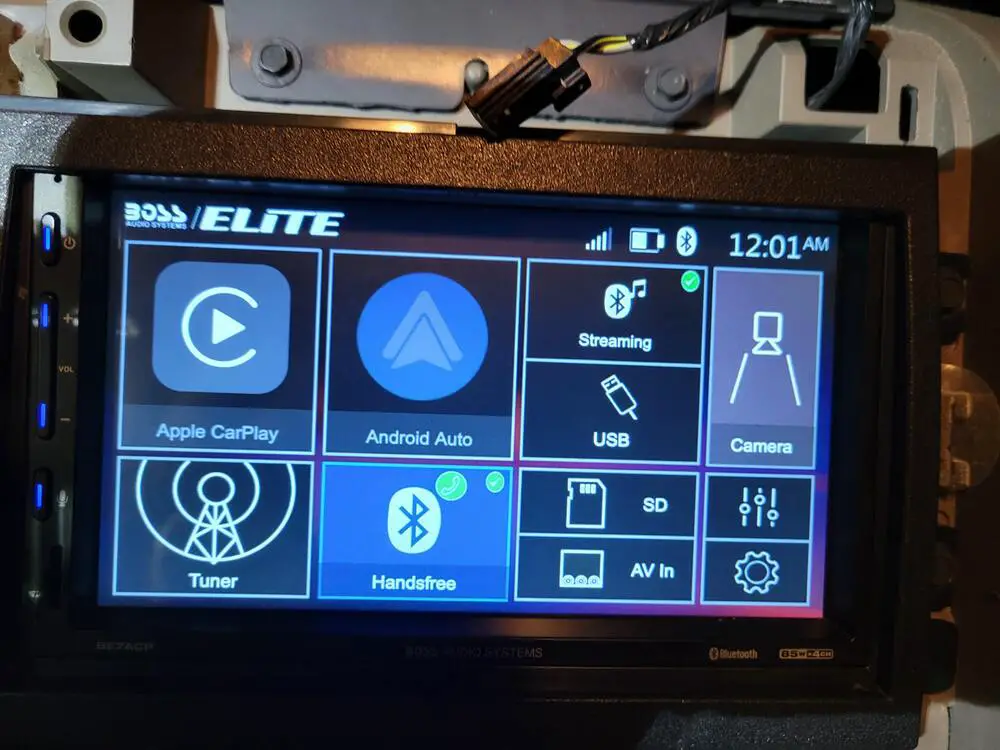
If your BOSS BE7ACP will not turn on, check whether it is truly without power before replacing the radio. First try the normal ignition and power controls. If the receiver remains completely dead, inspect its specified 15A fuse and the vehicle radio fuse. Then test the receiver’s constant battery supply (yellow), switched accessory supply (red), and ground (black) at the correct harness connection. A black touchscreen with audio still playing is a different problem from a radio with no power at all.
The order matters: a blown fuse, a missing accessory feed from a vehicle interface, a loose ground, and an actual receiver failure can look identical from the driver’s seat. This guide covers the BE7ACP; suffix versions such as BE7ACP.X and BE7ACP.WX have different controls or installation details, so use the exact model printed on your unit.
Electrical safety: Park with the parking brake set. For visual wiring inspection or fuse removal, switch the ignition off and follow the vehicle and receiver manuals; disconnect the negative battery terminal before changing wiring. Live voltage measurements should be made only if you know how to use a meter safely around exposed automotive conductors. Do not probe airbag circuits, bridge power wires, install oversized fuses, or connect the radio to a loose battery on a workbench.
Start here: which problem do you have?
Choose the symptom closest to yours. The checks below are not all interchangeable.
The first decision: power failure or display failure?
Three different symptoms lead to different tests. Use this diagram before taking the dash apart.
01
Completely dead
No screen, button lights, sound, or startup response.
Next: Check vehicle and radio fuses, then constant power, ACC and ground.
02
Screen dark, audio works
Sound or other controls respond even though the display appears black.
Next: Check standby/screen-off, brightness, illumination and camera inputs.
03
Boots, then shuts down
The display flashes or restarts when a load or ignition state changes.
Next: Check power stability, harness connections, shorts and installation interfaces.
These are diagnostic categories, not fault probabilities.
1. Try the controls before removing the receiver
- With the car safely parked, switch the ignition to ACC or the position that normally activates the stereo. Some vehicles do not supply the radio feed in every key position.
- Try the unit’s normal power control, noting whether the display, button backlights or audio responds. A software restart is not a substitute for missing electrical power.
- If audio works but the screen is black, check the display-off/standby feature and illumination or brightness settings for the exact model. Observe whether switching the headlights changes the symptom.
- If the screen goes black only when selecting reverse, check whether the radio has entered camera view with no usable camera video. Do not change safety wiring to bypass the fault.
- If the receiver was just installed, stopped after a battery replacement, or only works in some key positions, give extra attention to the accessory-power interface.
If the unit still shows no signs of life, move to the fuse and supply checks. If controls or audio respond, skip to the black-screen troubleshooting section.
2. Inspect the BE7ACP fuse and the correct vehicle fuse
The BE7ACP owner’s manual specifies a 15A receiver fuse and warns that replacements must match the original type and value. Do not substitute a 20A fuse or assume the vehicle’s radio fuse is also rated 15A. The vehicle fuse must be checked against the vehicle’s own diagram.
- Turn the ignition off. Before working behind the dashboard, disconnect the negative battery terminal according to the vehicle’s service instructions.
- Locate the receiver fuse in the position shown by the manual and compare the replacement’s amp rating and physical style to the installed fuse.
- Inspect the vehicle radio/audio/ACC fuse using the vehicle’s fuse chart. Another accessory working does not prove the specific radio circuit is good.
- A fuse can look intact but be open. An experienced user can confirm continuity only after removing the fuse from an unpowered circuit.
- Replace a blown fuse only with the specified type and rating. If the replacement immediately blows again, stop: a short or equipment fault needs diagnosis.
Some BE7ACP-related suffix models explicitly label a 15A ATO-style rear fuse. Confirm the precise rear-panel fuse type on your own BE7ACP rather than transferring a diagram from another suffix model.
3. Confirm the three connections that actually power the radio
The BE7ACP uses yellow for the constant battery supply, red for the switched accessory supply, and black for ground in its receiver harness. Those are functions in the BOSS harness—not permission to match the same colors to unknown factory wires. The factory vehicle connector may require a correctly programmed retention/CAN-bus interface.
Which wires power a BE7ACP?
Conceptual power-flow guide: identify wires using the exact BOSS harness and vehicle/interface documentation. This is not a connector pinout.
YELLOW
Constant +12V
Normally present with ignition on or off; maintains the receiver’s battery feed.
RED
ACC / switched +12V
Normally appears when the correct accessory/ignition state is active.
BLACK
Ground / return
Must have a sound connection to the appropriate ground path.
Not an ignition input: Blue/white is a remote turn-on output for an external amplifier. Blue is an antenna-control output. Neither should be used as the BE7ACP’s main accessory-power input.
Voltage check with a digital multimeter
If you are comfortable with live DC measurements and have a reliable chassis-ground reference, use a multimeter set to DC volts, with its leads in the voltage and COM jacks. Never use its current or resistance mode to probe a live radio feed. Read the meter instructions first, and avoid touching adjacent pins or exposed metal with the probe tips.
| Test point (BOSS harness) | Ignition OFF | ACC / ignition ON | Meaning |
|---|---|---|---|
| Yellow → known good ground | Approximately vehicle battery voltage | Approximately vehicle battery voltage | No voltage points to constant feed, fuse, connector or interface problem |
| Red → known good ground | Usually near 0 V* | Approximately vehicle battery voltage | No switched voltage in ACC points to the vehicle accessory circuit or interface |
| Black → proper ground path | Verify secure connection with power off | A professional can check voltage drop under load | Bad ground can mimic dead radio even when a meter finds supply voltage |
Reading 12V is not the same as proving the circuit can supply the receiver under load. If the radio repeatedly reboots or the reading collapses during startup, an installer should perform a proper loaded voltage-drop test of the power and ground paths.
4. Use the results to narrow the fault
Power test → next action
YELLOW MISSING
Check constant-feed path
Battery feed, receiver fuse, vehicle fuse and harness connection.
RED MISSING
Check ACC/interface
Ignition feed or vehicle-specific accessory/retention module.
BOTH PRESENT
Check ground and radio
Harness seating, supply under load, reset, and then receiver service.
A simple high-impedance voltmeter reading cannot rule out an intermittent connection or low-current supply.
If the BE7ACP powers up only when the key is turned farther, or it stopped working after an aftermarket installation, do not connect the blue/white remote output to a random ignition wire. Check the vehicle-specific interface instructions. Some installations generate the radio’s ACC feed electronically rather than offering a traditional switched 12V wire.
5. When the screen is black but the stereo is still powered
A dark screen does not always indicate lost radio power. If music plays, button illumination responds or calls still connect, start with display controls, illumination, and external camera inputs—not the battery feed.
| Symptom | Likely check first | Do not assume |
|---|---|---|
| Audio works, no picture | Screen-off/standby function, brightness and dimmer setting | The radio is electrically dead |
| Black display when headlights turn on | Illumination setting and the correct dimmer input for that particular BE7ACP variant | The main constant feed has failed |
| Blank screen only while reversing | Reverse/camera trigger state, camera power and video signal | The receiver needs a replacement screen |
| Logo appears, then radio restarts | Supply stability under load, harness strain, speaker-output shorts | A factory reset will repair damaged wiring |
| Receiver fuse blows again | Stop powering the unit and investigate the short or faulty equipment | A higher-rated fuse is a safe fix |
6. Should you reset the BOSS BE7ACP?
A reset can help if the processor is frozen, but only after you have ruled out missing power. The BE7ACP documentation describes a front-panel system-reset point; consult your exact model’s control layout before using a small nonconductive pin or other tool recommended by BOSS. A reset may clear settings or paired devices. If the head unit has no supply or a blown fuse, pressing reset cannot solve it.
Before removing the receiver for further testing, disconnect the vehicle battery as directed in the installation manual. Do not repeat resets while a fuse is blowing, wires are hot, or the receiver shows signs of water or heat damage.
Useful tool: a meter that can verify power before you buy parts
A digital multimeter is the most useful optional purchase for this problem. Many readers already own one; if you do, keep it. A replacement radio, generic harness, and random fuse assortments are poor first purchases until the fault has been identified.
Klein Tools MM420 — for checking radio supply voltage

Choose it if: You need to test 12V accessory and constant power, check an unpowered fuse for continuity, or investigate other household/vehicle electrical problems.
Skip it if: You already have a functional, appropriately rated DC-voltage multimeter or you are not comfortable testing live vehicle wiring.
The MM420 can measure DC voltage and continuity, includes test leads, and has a lead-placement warning feature. Its extra True RMS, temperature and frequency features are not necessary just to diagnose a radio power feed. The advantage here is repeatable voltage measurements rather than guessing whether a wire is live.
Keep both probes in the proper jacks, select the correct function, and follow the safety steps in the official Klein Tools instructions and product information. If a vehicle interface is involved or a live harness connection is inaccessible, pay an installer rather than damaging terminals by force-probing them.
What else you need: Your BE7ACP manual, the vehicle’s fuse chart, safe access to the radio harness, and the vehicle-specific interface instructions if one is installed. The meter is not a harness adapter and does not repair shorts.
Fuse, harness or replacement radio: what should you actually buy?
| Item | When it helps | Required check |
|---|---|---|
| 15A receiver fuse (same physical type) | Only if the existing BE7ACP fuse is faulty | Compare to the fuse originally installed; find and fix the cause if it blows again |
| Vehicle radio/ACC fuse | Only if the corresponding vehicle circuit fuse is faulty | Use the fuse rating and shape shown in the vehicle owner’s manual |
| Vehicle-specific harness/interface | If the installation lacks a compatible ACC feed or retention interface | Exact car year, trim, factory audio system and interface instructions |
| Replacement receiver or professional repair | If good power, ground and fuse are confirmed and the radio still will not respond | Get a professional diagnosis and check repair/warranty options first |
For a compatible replacement fuse, the BE7ACP specifies 15A at the receiver, while the vehicle fuse may differ. Do not purchase an assortment just to experiment, and never bridge a fuse with wire or foil. Where the harness was added to a specific car, its correct interface can be more important than the stereo brand.
When to stop troubleshooting and contact BOSS Audio
- A fuse fails again immediately after replacement.
- Wiring insulation is damaged, unusually warm, melted or smells burned.
- Both power feeds and the ground path are confirmed under appropriate conditions, but the receiver does not respond.
- The car uses a CAN-bus/steering-wheel/retained-accessory-power interface and its required programming or behavior is uncertain.
- Water damage, repeated rebooting or the need for bench testing suggests a professional repair.
Keep the model and suffix, purchase information, installation adapter part number, and a short record of the checks performed. Use BOSS Audio’s official website to locate its current technical-support contact information. Do not open the receiver’s enclosure or bypass safety protections merely to rule out an internal fault.
Frequently asked questions
What fuse does a BOSS BE7ACP use?
The BE7ACP manual specifies a 15A fuse for the receiver. Replace it only with the same type and rating. The separate factory radio fuse can be a different rating, so follow the vehicle fuse chart.
Can the blue/white remote wire keep the BE7ACP from switching on?
Not as a missing power input. On the BE7ACP, the blue/white remote lead is an output to control an external amplifier. The receiver’s accessory input is red. A short or wrong connection involving any wire can still cause electrical problems, but the remote output is not where you should look for switched power going into the radio.
Why does the radio work in one key position but not another?
The switched ACC feed may not be present in that key position, or the aftermarket interface may be configured incorrectly. The answer depends on the exact vehicle, factory audio package and interface. Check those before adding wires.
Will a factory reset fix a completely dead BE7ACP?
Only if the receiver still has correct power and the issue is a recoverable software lockup. A reset cannot restore an absent yellow battery feed, red accessory feed, bad ground or blown fuse.
When should I replace the receiver?
After verifying both required feeds, a sound ground, the correct fuse, and the vehicle interface—and ruling out a dark-screen-only problem. If those checks are good but the unit stays dead, BOSS support or a qualified installer should determine whether repair or replacement makes sense.
Bottom line
For a completely dead BOSS BE7ACP, start with the 15A receiver fuse, the appropriate vehicle radio fuse, yellow constant supply, red accessory supply and black ground. For a black screen that still responds, check display and camera behavior instead. Diagnose the missing function before replacing the receiver, and never treat the blue/white remote output as its ignition input.