As an Amazon Associate & Influencer, we earn from qualifying purchases you might make if you click any of the links or buttons on this page at no expense to you.
Apple’s iOS 18 brought exciting new features to iphone users, but it also introduced some frustrating CarPlay compatibility problems. Many drivers are experiencing connection drops, audio glitches, and interface freezes when using CarPlay after updating to iOS 18. This comprehensive guide will help you diagnose and resolve these issues, getting your CarPlay system back to smooth operation.
Understanding the Root Problems With IOS 18
Software Compatibility Conflicts
iOS 18 introduced significant changes to how CarPlay communicates with vehicle infotainment systems. These updates sometimes create compatibility gaps with older car models or aftermarket head units that weren’t designed to handle the new protocols.
Bluetooth and Wi-Fi Communication Errors
The new iOS version altered underlying wireless communication protocols. This means your iPhone might struggle to maintain stable connections with your car’s system, leading to frequent disconnections or failed pairing attempts.
Cache and Memory Management Issues
iOS 18’s updated memory management can interfere with CarPlay’s background processes. Corrupted cache files or conflicting app data often cause the system to freeze or respond slowly during use.
Step-by-Step Resolution Process Of Carplay Issues with IOS 18
Initial Quick Fixes (5-10 Minutes)
1. Force Restart Your iPhone
Press and quickly release the volume up button, then volume down, then press and hold the side button until the Apple logo appears. This clears temporary glitches that might be affecting CarPlay connectivity.
2. Check carplay settings
Navigate to Settings > General > CarPlay on your iPhone. Verify your vehicle appears in the list and shows as connected. If it’s missing, you’ll need to re-pair the devices.
3. Toggle CarPlay Off and On
In the same CarPlay settings menu, tap your vehicle name and select “Forget This Car.” Wait 30 seconds, then reconnect by starting your vehicle and following the pairing process.
Intermediate Troubleshooting (15-30 Minutes)
4. Reset Network Settings
Go to Settings > General > Transfer or Reset iPhone > Reset > Reset Network Settings. This removes all saved Wi-Fi passwords and Bluetooth connections, so you’ll need to reconnect to your home network afterward.
5. Update Vehicle Software
Check your car manufacturer’s website or contact your dealer about available infotainment system updates. Many brands released patches specifically addressing iOS 18 compatibility issues.
6. Clear CarPlay Cache
Delete and reinstall apps that frequently crash during CarPlay use. This removes corrupted data that might be causing stability problems.
Advanced Solutions (30-60 Minutes)
7. USB Connection Diagnosis
If using wired CarPlay, try different lightning cables and USB ports. Inspect cable ends for debris or damage. Clean iPhone charging port with compressed air or a soft brush.
8. Bluetooth Module Reset
Some vehicles allow Bluetooth module resets through hidden service menus. Consult your owner’s manual or search online for your specific make and model’s reset procedure.
9. Factory Reset Considerations
As a last resort, backing up and factory resetting your iPhone often resolves persistent CarPlay issues. Ensure you have recent backups before proceeding.
DIY vs Professional Solutions: Carplay Issues with IOS 16
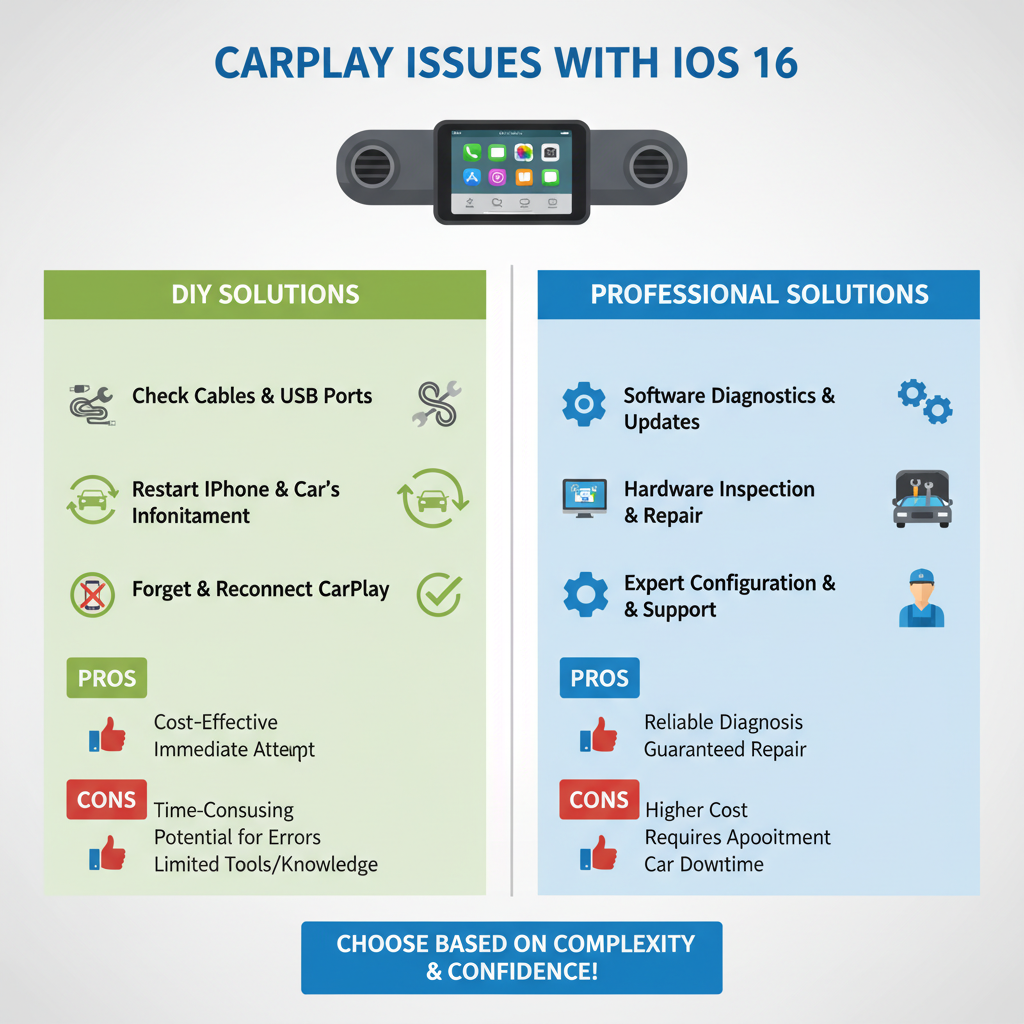
✅ Owner-Friendly Tasks
– iPhone software updates and restarts
– CarPlay settings adjustments
– Cable replacement and port cleaning
– App management and reinstallation
– Basic vehicle infotainment resets
🧰 Professional Service Required
– Vehicle software updates requiring dealer equipment
– Infotainment system hardware replacement
– Complex wiring harness diagnosis
– Warranty-covered repairs on newer vehicles
– Integration module programming
Vehicle-Specific Considerations
Older Vehicle Models (2016-2019)
These cars often need manufacturer software updates to work properly with iOS 18. Contact your dealer about available patches, as many were released throughout late 2024.
Aftermarket Head Units
Third-party CarPlay systems may require firmware updates from the manufacturer. Check the brand’s website or contact customer support for iOS 18 compatibility information.
Luxury Vehicle Brands
Premium manufacturers like BMW, Mercedes-Benz, and Audi typically release updates through their connected services apps or dealer networks. These updates often address CarPlay issues more quickly than mass-market brands.
Safety Precautions During Troubleshooting
Electrical System Safety
Always turn off your vehicle’s ignition before disconnecting or reconnecting USB cables. Some cars continue powering USB ports even when off, which can cause data corruption during reconnection.
Driving Safety Warnings
Never attempt CarPlay troubleshooting while driving. Pull over safely and engage the parking brake before making any adjustments to your phone or infotainment system.
Data Protection
Back up your iPhone before performing network resets or factory resets. Use iCloud or iTunes to ensure you don’t lose important data during the troubleshooting process.
Preventing Future CarPlay Problems
Regular Maintenance Schedule
Update your iPhone and vehicle software promptly when new versions become available. Enable automatic updates on your iPhone to catch CarPlay-related fixes quickly.
Cable Care and Replacement
Replace Lightning cables every 12-18 months or when you notice connection issues. Keep a spare cable in your vehicle for emergency use.
App Management Best Practices
Regularly update CarPlay-compatible apps and remove ones you don’t use. Fewer active apps reduce the chance of conflicts and improve overall system stability.
When to Seek Professional Help
Contact your vehicle dealer or a qualified automotive technician if you experience persistent issues after trying these solutions. Problems requiring professional attention include:
– Hardware failures in the infotainment system
– Warranty-covered CarPlay malfunctions
– Complex integration issues with vehicle systems
– Repeated failures despite following troubleshooting steps
Long-Term Outlook and Solutions
Apple continues releasing iOS 18 updates that address CarPlay compatibility issues. Most connection and stability problems resolve within 2-3 months as both Apple and vehicle manufacturers release patches.
Consider upgrading older aftermarket head units if compatibility problems persist. Newer units designed with iOS 18 in mind offer better long-term reliability and feature support.
The key to resolving CarPlay issues with iOS 18 lies in systematic troubleshooting, starting with simple software fixes before moving to hardware solutions. Most problems stem from software conflicts rather than hardware failures, making them resolvable through the steps outlined in this guide.
Remember that technology integration between different manufacturers takes time to perfect. Patience and methodical troubleshooting usually restore full CarPlay functionality without expensive repairs or replacements.